7 Best Event Photo Sharing Apps Compared (2026)
Compare 7 event photo sharing apps by guest access, photo approval, downloads, and storage limits. Find the right fit for your party, birthday, or wedding.

Short answer: Choose an event photo sharing app by the steps your guests must take and the controls you need. Gather Shot suits hosts who want browser uploads and approval before photos appear, while Google Photos or iCloud may be enough for a group that already shares albums.
- Gather Shot: QR uploads, a moderated gallery, and optional photo challenges.
- Guestpix or Wedibox: Guestbook features, with different party and wedding packages.
- Kululu: A live photo wall, including a limited free plan.
- GuestCam: Longer upload windows and an optional face-search tool.
- Google Photos or iCloud: Shared albums without a per-event fee, with account or storage trade-offs.
Compare all seven apps · See when Gather Shot fits
About this comparison: Gather Shot publishes this guide. We refreshed the plan details and Apple album guidance on October 6, 2026 using official sources, not comparative hands-on ratings. Read our methodology .
Best event photo sharing apps compared
Compare guest access and gallery controls first. For current prices, follow the official plan links in each product section.
| Option | Best fit | Guest access | Main trade-off |
|---|---|---|---|
| Gather Shot | QR collection with approval before display | Browser, no guest account | Plans have upload caps |
| Guestpix | Party photos and written guestbook messages | Browser, no guest account | Small is photos only |
| Kululu | Live photo wall for a short event | Browser via QR code or link | Approval before display requires Pro |
| GuestCam | Long collection window or face search | Browser, no guest account | Face search is an optional add-on |
| Wedibox | Wedding photos plus planning tools | Browser, no guest login | Guest-visible galleries depend on the plan |
| Google Photos | Groups already using Google accounts | Link viewing, Google sign-in to contribute | Not an approval queue for a live event |
| iCloud Shared Albums | Hosts who use Apple Photos | Native Apple app or web, depending on album version | Legacy and newer albums work differently |
Do not treat “moderation” as one feature. Deleting a photo after people see it is different from approving it before display. Gather Shot, Guestpix, GuestCam, and Kululu Pro document approval workflows. Check the setting on the plan you intend to use before collecting photos.
Compare the cost of the feature you need
A starting price can hide the relevant plan. For a live screen with manual approval, Kululu requires Pro, listed at $99, rather than its $39 Plus plan. Gather Shot includes moderation and a slideshow in Basic at $59.99, with a 1,000-upload cap. GuestCam lists Standard at $49, including moderation and a six-month upload window; its $45 MagicFind face-search add-on is optional. These are listed USD prices checked October 6, 2026, not checkout quotes. Taxes, promotions, and terms may change.
For a wedding website with audio messages, Wedibox’s $49 Wedding plan is a different purchase from a photo-only album. For Guestpix, check the current USD party package price and whether you need Small’s photo collection or Medium’s video support. Compare the included tools before paying for separate invitations or guestbooks. The official sources and limits are linked below.
Who this is for (and not for)
This guide is for people choosing where guests will send their photos:
- Birthday and party hosts with a mix of iPhones and Android phones.
- Couples who want guest candids alongside their professional wedding photos.
- Planners who need someone to review uploads before they reach a shared screen.
It is not a guide to professional client-gallery delivery or long-term photo backup. If you need a few pictures from friends, your existing chat may be enough. If you need a lasting family archive, compare storage and export options before paying for an event service.
There is no magic guest count where a shared album stops working. A larger group that already uses Google Photos may need less help than ten guests unfamiliar with it. Choose around account access, photo and video limits, and whether anyone will manage the gallery during the event.
For the setup work after you choose, use our event photo collection guide . The comparison focuses on what to buy, what you can try free, and where each option falls short.
7 best event photo sharing apps
1. Gather Shot
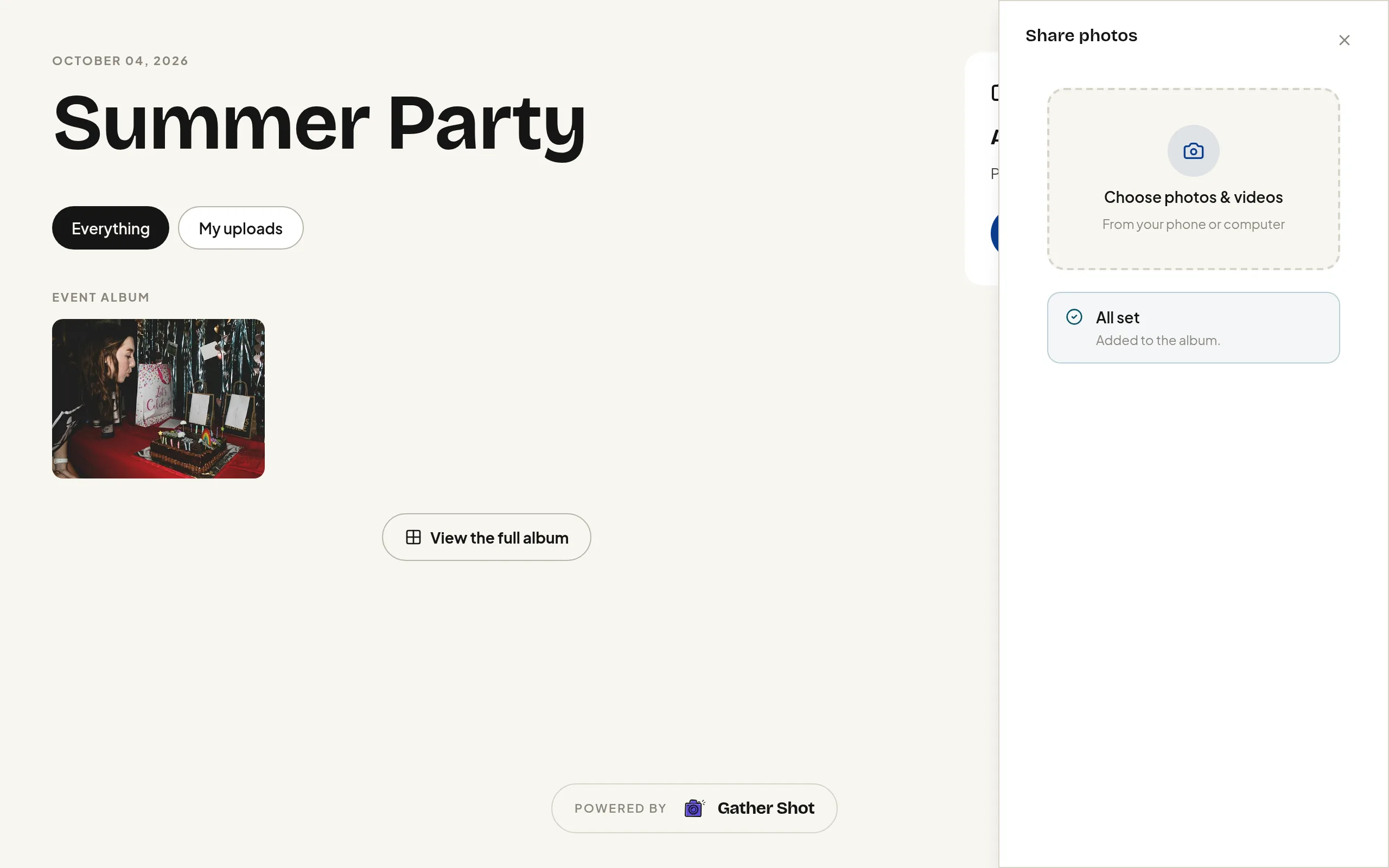
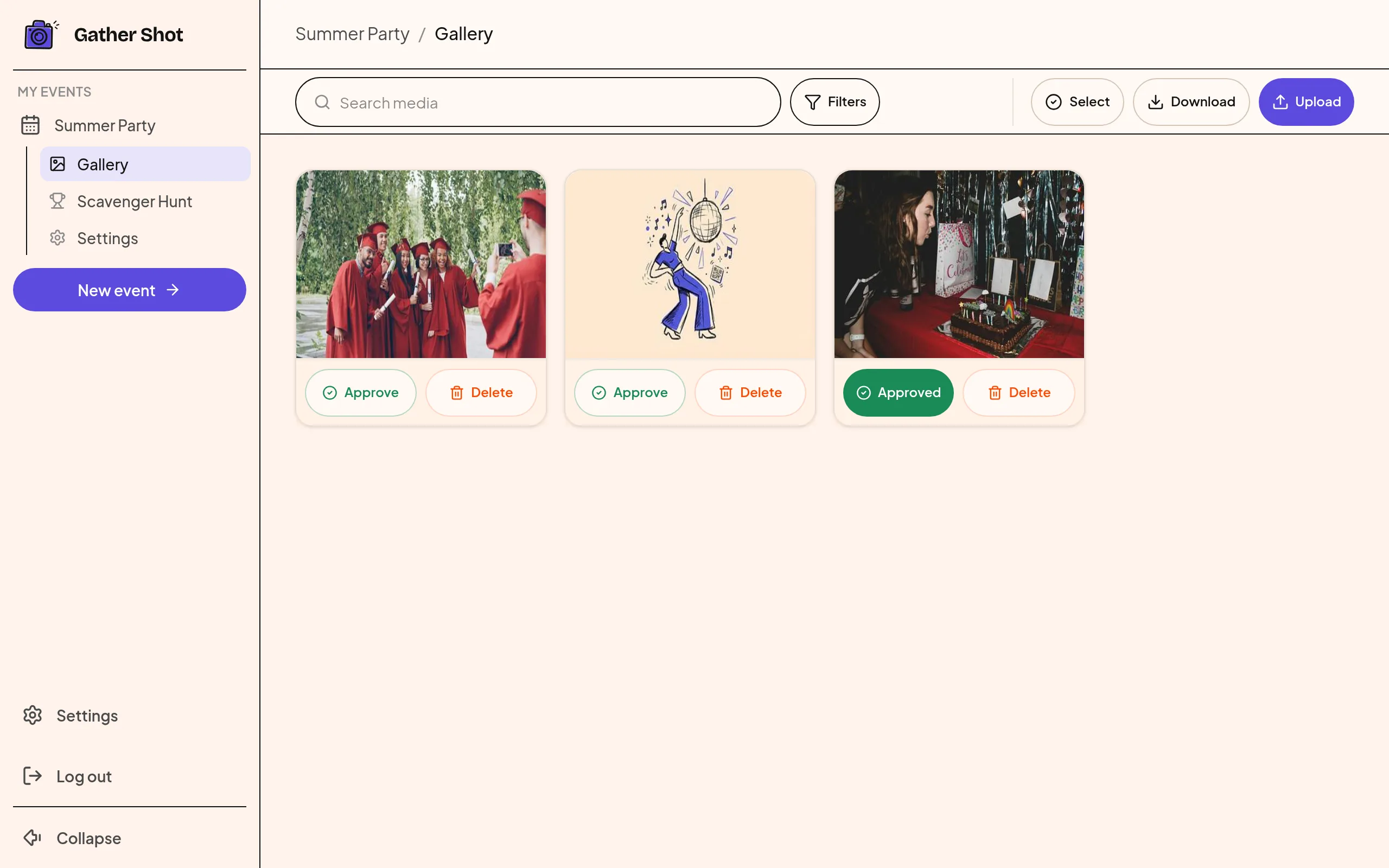
Gather Shot is a photo and video sharing platform for events. Guests scan a QR code or open a link, choose files, and upload in their browser without creating an account. Hosts can review uploads before approving them for the public gallery and live slideshow .
Choose Gather Shot when you want one collection page, moderation tools , and a co-host who can help manage photos. Photo scavenger hunts add prompts when you want an activity as well as an album.
Choose something else when everyone already shares a Google or Apple album and you do not need event controls. GuestCam also deserves a look if collecting uploads for several months matters more than Gather Shot’s event schedule.
Plan limits: Basic includes 1,000 uploads; Pro includes 5,000 and scavenger hunts. Basic has an optional hunt add-on. Both paid plans include one year of storage. Check Gather Shot’s current plans and trial limits before choosing.
No guest account does not always mean no questions: optional consent and guest-data settings can add steps, including email verification. Enable approval before sharing the gallery; guests can still see their own pending uploads.
Collection and downloads: The standard upload limit is 90 days. Your actual closing date depends on your opening time, duration, and plan limit; Enterprise, custom plans, and extensions can have different limits. Check your event settings before sharing a deadline. The pricing page lists full-resolution ZIP downloads during the hosting period. One year of storage does not mean one year of guest uploads.
2. Guestpix
Guestpix combines a QR photo gallery with guestbook messages. Among its party packages , Small includes photos and a written guestbook; Medium adds videos and a video guestbook. Both list a three-month upload window and a 12-month download window, starting on the event date, with full-resolution ZIP downloads for hosts and guests.
Choose Guestpix when written messages matter as much as pictures. The party packages include digital invitations and RSVPs, so compare those with any invitation tool you already use.
Watch out for: Small does not include video uploads. Guestpix’s moderation guide says that, when moderation is enabled, pending uploads are visible only to the uploader and host until approved. Its advertised unlimited-guest offer also carries a 1,000-guest fair-use limit.
The public page offers a free start with 50 photos and a 30-day upload window. Wedding packages differ from party packages, so check the inclusions for your event type.
3. Kululu
Kululu centers the experience on a digital album and a live photo wall. Guests open a link or scan a code, and the wall runs in a browser on a connected screen.
Choose Kululu when the shared screen is the main attraction. Its official pricing lists a free plan with 100 photo and video uploads, a 24-hour upload window, and seven days of storage. Free uploads stay in standard quality. That can suit a short party, but it leaves little time for late submissions.
Plus includes 500 uploads, a one-month upload window, and three months of storage. Pro lists unlimited uploads subject to its terms and fair-use policy, a three-month upload window, and one year of storage. Both paid plans list original-quality storage and one-click album downloads. See the plan comparison for current terms.
Watch out for: Manual approval requires Pro . By default, guest uploads appear immediately. A free live wall and a screened live wall are different offers.
4. GuestCam
GuestCam collects photos and videos through a browser and offers MagicFind, an optional tool that uses a selfie to find photos of a guest.
Choose GuestCam when you want a long upload window or guests need help finding themselves in a large gallery. The plan page lists Standard with six months for uploads and 12 months of storage. Premium includes 12 months for uploads and 14 months of storage. Both windows start on the event date. Both plans list unlimited guests, photos, and videos, plus original-file ZIP downloads. MagicFind is an optional add-on.
GuestCam also lists an audio guestbook on both plans. For a milestone birthday, that gives guests a way to leave spoken memories as well as pictures. Premium includes a dial-in phone number; a dedicated number is also listed as a $30 add-on for US and Canadian numbers. Check the recording route you want rather than assuming all audio guestbooks work by phone call.
Watch out for: Face search adds cost and deserves a privacy discussion with your guests. Do not buy it solely because the guest list is large.
GuestCam’s moderation instructions describe approval before uploads become visible to other guests. Turn it on before collection starts because it only affects new uploads. We opened its public demo , which displayed a notice that moderation was enabled and video uploads were disabled. We did not submit files or test approval.
5. Wedibox
Wedibox is worth comparing if you want wedding photo sharing and planning tools in the same service. Its pricing page separates Free, Wedding, and All-In-One plans.
Choose Wedibox when you need a wedding website or want to combine photos with an audio guestbook. The Wedding plan lists unlimited guest uploads, a live slideshow, six months for uploads, and one year of storage. All-In-One adds RSVP and seating tools, with a one-year upload window and two years of storage.
Watch out for: The free plan includes 50 guest photo uploads and scavenger-hunt challenges, but describes the gallery as “for your eyes only.” Do not assume it includes a guest-visible gallery or the paid live slideshow. A separate Embed option provides a gallery inside an existing website.
Check your exact upload and storage dates at checkout. Wedding lists an original-quality ZIP, but the FAQ says bulk downloads are available after the event ends, while another section says “at any time.” Confirm export timing before relying on a download during the event.
6. Google Photos shared albums
Google Photos can be enough when your guests already have Google accounts. A shared link lets people view an album without installing the app, while contributors sign in to add photos.
Choose Google Photos when the group already knows how to share albums and you want to avoid a per-event purchase. Google’s sharing guide covers album links and QR sharing. A QR code is not exclusive to paid event services.
Watch out for: A link that works for viewing does not prove that every guest can upload without signing in. Check the Collaborate setting and try the invitation with someone outside your account. Google’s album controls cover sharing and contributor access, rather than an event-style approval queue.
There is no per-event charge, but Google account storage still matters: up to 15 GB is shared across Photos, Drive, and Gmail. Google’s sharing guide distinguishes saving a copy to your Photos library from downloading it to your device. Keep a separate copy of photos you want to retain if another person owns the album.
7. iCloud Shared Albums
iCloud needs a more careful comparison than “Apple only.” Apple’s September 2026 documentation separates albums created in iOS 27, iPadOS 27, macOS 27, or on the web from legacy albums. Older albums keep their earlier behavior unless upgraded.
Native experience: Hosts using Apple Photos can create and manage albums in the Photos app. That is different from asking every guest to own an iPhone.
Web contribution: Apple’s current Shared Albums guide says the newer experience supports joining and contributing on the web without an Apple Account or Apple device. Android guests therefore have a documented web route. We did not test that route on an Android phone.
Legacy viewing: Older albums can expose a Public Website for browser viewing. That viewing link is not the same as the newer contribution flow. Existing albums stay in the older format unless the owner upgrades them .
Choose iCloud when the host already uses Apple Photos and can check the album version and guest permissions in advance. Approving someone to join is not the same as approving each upload; check that contributors have “Can Add Photos” permission.
Watch out for storage and quality: Newer standard albums count uploads against the owner’s iCloud storage, including guest contributions. Legacy albums do not, and items already present when an album is upgraded remain exempt. Apple lists a 100-participant limit, including the owner, for newer albums. Legacy albums have a 5,000-item cap, reduce ordinary photos to 2,048 pixels on the long edge, and deliver videos at up to 720p. Newer albums support full-resolution sharing, but Apple warns that downloaded copies may not contain all original information. See the version-specific limits and regional availability notes. Temporary albums have separate limits; do not treat them as long-term storage.
How to choose the right photo sharing app for events
Start with a guest’s first visit, not a feature count. These are checks to run on your shortlist, not upload tests we performed for this review.
- Open the invitation while signed out. Check whether the guest can view, contribute, or both. Note any account, name, email, or consent steps.
- Try a photo and a short video on two phones. Use an iPhone and an Android phone if both will attend. A browser preview does not test the camera-roll picker or upload completion.
- Check approval before display. If you need moderation, enable it before the test. Confirm that an unapproved upload stays off the guest gallery and screen.
- Check the clock and the cap. Write down the upload allowance, when uploads close, and when storage ends. These are three different limits.
- Download a sample. Check its quality and confirm you can save the collection before the storage deadline.
For a birthday with a small photo budget, start by comparing the free limits. For a wedding, add guestbook needs and time for late photos. For a live screen, assign someone to review uploads. Moderation will not help much if nobody has time to approve anything.
Frequently asked questions
Is there a free event photo sharing app with a QR code?
Yes. Kululu’s free plan includes 100 uploads and a 24-hour upload window. Wedibox and Guestpix each list a 50-photo free option with different sharing limits. Gather Shot offers a free trial so you can test the guest upload flow before choosing a plan.
Can iPhone and Android guests contribute without an account?
Gather Shot, Guestpix, GuestCam, and Wedibox document browser uploads without guest accounts. Apple’s newer Shared Albums documentation also describes account-free web contribution. Google Photos contributors need Google sign-in. Check the actual invitation and settings, especially when an older iCloud album is involved.
Which apps can approve photos before guests see them?
Gather Shot, Guestpix, GuestCam, and Kululu Pro document this workflow. Enable the relevant setting before collection starts. Approval before display, removing a photo later, and approving a person to join are different controls.
What if the venue has no WiFi?
Browser uploads need an internet connection, which can be mobile data if coverage is good. Without either, ask guests to keep their photos and upload later. Do not plan a live wall around an untested connection. Make sure your chosen upload window extends beyond the party.
What is the best party photo sharing app for birthdays?
Choose around the work you want guests to do. A familiar shared album can suit friends, while QR collection can help a mixed group contribute without account setup. For a screen, compare Kululu and the other live-slideshow options. For photo prompts and host approval, compare Gather Shot. Our birthday photo-sharing tips cover signs and reminders.
What should wedding hosts check before buying?
Decide whether you need photos, typed guestbook entries, audio messages, or planning tools. Then check the package rather than assuming every guestbook supports every format. Guest uploads complement a photographer’s work, not replace it. Our wedding photo collection guide helps plan that part of the day.
Pick a shortlist, then try the guest steps
Choose two options that fit your event and work through the same checks on each. If your group already shares albums and you do not need approval or a live screen, you may not need a paid event service at all.
If you do need event tools, compare the whole plan. Guestpix’s written guestbook, Kululu’s free wall, GuestCam’s longer upload window, and Wedibox’s wedding planning features each give a host a reason to choose them. Gather Shot fits when you want browser uploads, a gallery you review, and photo challenges in one place.
For a birthday, decide where the QR signs will go and who will remind guests to upload. Our birthday party photo guide covers that plan, and the birthday party page shows where Gather Shot fits. Keep the upload deadline in your reminder and save your files before storage ends, whichever service you pick.
See Gather Shot’s pricing and trial limits before sharing your event with guests.
How we researched this comparison: We rechecked official pricing, help pages, and Gather Shot’s feature list on September 22, 2026. We opened public pages and a competitor demo, but lacked the host accounts and permissions for comparable upload, approval, and download tests. We did not buy competitor plans or submit files to their services. Recommendations reflect documentation, not a ranked score.
On October 6, we reread the official Guestpix party packages, Kululu pricing and embedded plan table, GuestCam pricing, Wedibox pricing, Google sharing instructions, and Apple Shared Albums guide. This refresh adds plan-specific cost comparisons and GuestCam’s documented audio options. It does not add new hands-on product tests.
On October 2, we captured the Gather Shot screenshots using a local demo event and nonprivate sample images. We completed a browser upload and displayed the host’s pending and approved states. This does not establish production performance, mobile upload behavior, or how Gather Shot performs against competitors. Check each provider’s linked documentation for current terms before buying.
Last updated:
Written by
Gather Shot TeamThe Gather Shot team writes guides, planning resources, and product updates that help event hosts and photographers collect guest photos without asking anyone to download an app.
Related articles
More practical guides selected from the same event photo sharing topics.
Sales Kickoff Team-Building Activities: A 45-Minute Photo Challenge Session
Run sales kickoff team-building activities in 45 minutes with three fictional customer challenges, a timed host script and seated options. Copy the session.
Oct 23 · 15 min read
Hundreds of Uploads, One Company Photo Hunt
A company photo hunt collected hundreds of uploads across several dozen challenges. See how prompt-based collection works and get ideas for your next offsite.
Oct 20 · 3 min read
Office Photo Scavenger Hunt: 15 Team Prompts
Plan an office photo scavenger hunt with 15 inclusive prompts, a timed agenda, seated alternatives and manual scoring. Copy the rules for your next offsite.
Oct 20 · 16 min read